Nonprofit Payment Processing: The Buyer's Awareness Guide Most Teams Wish They'd Read First
I’ve spent more than 25 years working with small and midsize nonprofits, and I can tell you that payment processing is the part of the decision platforms talk about the least… but it’s one that costs teams the most when it’s wrong.
I want to slow down and actually explain it: what the pieces are, how they fit together, what’s different about payment processing for nonprofits specifically, and the handful of questions that protect you no matter which platform you pick.
When most nonprofits compare fundraising platforms, they look at three things: features, price, and how easy it is to use. Those things matter. But they’re the visible tip of a much bigger structure (and most teams never see the rest of it until the day they need to).
Underneath your donation forms and the dashboards sits the plumbing that decides whose bank account your donations land in, whose name shows on a donor’s credit card statement, and whether your monthly donors stay yours if you ever decide to switch platforms.
Important note: There are no affiliate links in this article, and no one paid us to mention them. Yes, 4aGoodCause is our platform, and I’ll be honest about how we approach nonprofit payment processing near the end. But this guide is meant to help any nonprofit make a smart choice, even if that choice isn’t us.
📬 Get fundraising strategies like this in your inbox. Join thousands of nonprofit pros getting practical, no-fluff fundraising guidance from our team. Subscribe to the newsletter.
First, what is nonprofit payment processing, really?
Here’s the plain-English version. Nonprofit payment processing (sometimes called nonprofit donation processing) is everything that has to happen, quietly and in a couple of seconds, between a donor entering their card on your donation form and the money showing up in your organization’s bank account.
It feels like one step. But it’s actually a short relay race between a few different players, each handling one leg.
Most articles use the names interchangeably, which is exactly why nonprofit teams end up confused, so let me separate the four you’ll hear most:
The fundraising platform is the software your donors actually see and your team works in every day: your donation forms, fundraising pages, recurring giving setup, and the donor records behind them.
The payment gateway is the secure online “checkout” that captures the donor’s card, encrypts it, and passes it along. It’s the piece that turns a filled-out form into a real charge.
The payment processor is the company that actually moves the transaction between the card networks and the banks, getting the donation approved and the money on its way.
The merchant account is the special holding account where card funds settle before they sweep into your regular nonprofit checking account.
You don’t have to memorize the boundaries between those four. Some providers bundle several of them into one signup (Stripe and PayPal work this way), and others keep them separate so you can mix and match (Authorize.net is the classic example).
I dig into what that means for ownership in our plain-English guide to payment gateways. For now, the only thing you need to hold onto is that “processing” is a chain made up of several, not a single product or action, and different links in that chain can be owned by different people, including you.
You focus on your mission. We'll handle the tech.
Get an instant walk-through of how to run fundraising with ease.
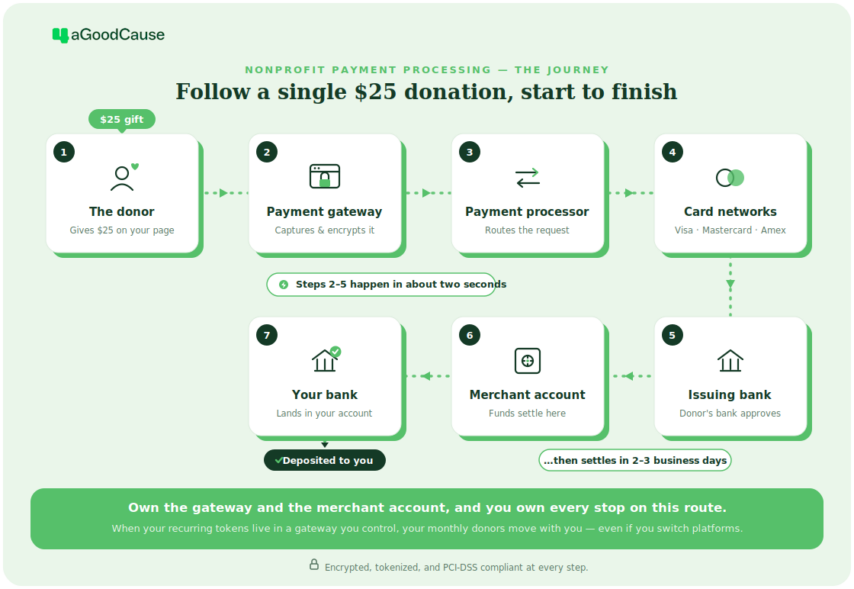
Let’s follow one $25 gift from click to deposit. This is the relay race I mentioned, in five steps.
The flow of a donation to your bank account
The donor gives on your form. On your online donation form, they enter their card and hit submit. Good donation page software encrypts that information the moment it’s typed, so the card details are protected from the very first second.
The gateway secures it. The payment gateway locks the card data down through tokenization (swapping the real card number for a random stand-in “token”) so the sensitive number isn’t sitting in your system. This is a big part of how processing stays safe and PCI compliant (more on that shortly).
The processor routes it. The payment processor sends the request out through the card networks (Mastercard, for example) to ask the donor’s bank a simple question: Is this card good for $25? Quiet fraud prevention checks run here too, including AVS (the address verification system that confirms the billing address matches). This is what keeps online transactions trustworthy.
The donor’s bank answers. Their bank approves or declines and places a hold on the funds. All of this (steps two through four) happens in about two seconds, before your donor even sees a thank-you screen.
The money settles. Later, usually within two to three business days, the approved financial transactions settle into your merchant account and then sweep to your nonprofit’s bank account. The fees taken along the way (the transaction fees) are split among the processor and the networks (and sometimes the fundraising platform, which we’ll get to—but 4aGoodCause doesn’t charge additional per-transaction fees).
That’s the whole loop. And good platforms don’t stop at “money moved;” they push each gift straight into your CRM or donor database, generate the donor’s receipt automatically, and feed your accounting software, so nobody on your team is rekeying numbers by hand.
💡 A quick word on security. Any reputable setup follows the PCI DSS standard (the payment card industry’s security rulebook) and leans on encryption, tokenization, and fraud prevention to protect cardholder data. The good news for small teams: when your provider handles PCI compliance for you, most of that burden stays off your plate. You should still ask any platform how they handle it.
Why does payment processing work differently for nonprofits?
A coffee shop and a charity both run credit card payments, so why does any of this deserve a separate conversation for nonprofits? A few reasons.
For a retailer, a subscription is a bonus. For a nonprofit, a monthly giving program “subscription” (or even one-time donor gifts) often are what make up your budget. The average monthly donor gives around $660 per year on the 4aGoodCause platform, and recurring donors retain at far higher rates than one-time givers. That makes the reliability and portability of your recurring donations a survival issue, not a technical footnote.
You collect money in more ways than a store does.
A nonprofit’s processing has to handle a wider mix than a typical checkout:
One-time gifts
Recurring giving
Membership dues
Event ticketing and event registration
Peer-to-peer fundraising
Matching gifts
Donor-advised funds (DAF)
Employer-matched gifts
Text-to-give donations
Each of those is a different kind of transaction, and not every processor or platform supports all of them cleanly. If you run membership fees or peer-to-peer campaigns, that needs to be on your evaluation list from the start.
Donor trust runs through the details.
The name on a donor’s card statement should be your organization’s, not a platform’s. When donors don’t recognize a charge (for example, they see a software platform’s name on their banka account), you get confusion, support emails, and chargebacks — and every chargeback chips away at trust and costs you a fee. Clean, branded donation receipts and accurate financial reporting do the same quiet trust-building work in the other direction.
Processing has to talk to the rest of your stack.
For most teams, the payment layer can’t live on an island. It needs to connect to your nonprofit CRM and donor management systems so a gift updates the right record, to your accounting software for reconciliation, and ideally to a customer portal (a donor portal) where supporters can manage their own recurring gifts.
When customer relationship management and payments are stitched together well, your small team stops doing double data entry.
You may qualify for nonprofit pricing.
Many processors offer reduced rates to verified 501(c)(3) organizations, but you can only take advantage of that if you’re allowed to shop your own processing. And a two-person development team doesn’t have an IT department to untangle a messy migration, so the platform that’s easiest to start with can quietly become the hardest to leave.
💡 Real wins for real nonprofits. 4aGoodCause donation pages convert at 27% on average — more than double the industry benchmark — with nearly 100 best practices built in from day one. Book a demo to see how.
“
As a small and growing nonprofit, we need a fundraising platform that serves not only our budgetary needs but also provides a seamless experience for our donors AND for us as well. 4aGC checks ALL the boxes. Excellent product and the best customer care around!
Kelly Mellen
Managing Director, Making Things Right
What payment methods should your nonprofit accept?
Part of “how processing works” is simply what your donors can use to give. The more friction you remove, the more gifts complete.
Credit and debit cards are still the backbone of online giving, and the one method every processor handles.
ACH and eCheck. ACH (the automated clearing house network) and eCheck pull funds directly from a donor’s checking account as bank transfers. ACH payments are usually meaningfully cheaper to process than cards, which adds up fast on recurring gifts. We break the math down in our guide to ACH payment processing for nonprofits, and I strongly recommend this route to my clients. If you run a large monthly giving program, ACH transfers are worth offering.
Digital wallets.Apple Pay and Google Pay let donors give in a tap from their phone, with no card typing (which lifts completion rates, especially on mobile).
Pay-by-app options. Depending on your platform, you may also be able to accept PayPal, Venmo, or Cash App, which some donors strongly prefer.
In-person giving. If you fundraise at galas, 5Ks, or a giving booth, you’ll want a way to take gifts on-site. Text-to-give, a reader with tap to pay, or a virtual terminal where staff can key in a card. Square is a common choice here, and Authorize.net also has a tap-to-pay app.
Text-to-give. For events and appeals, text-to-give (sometimes also called text-to-donate, although they’re different) lets supporters give from a phone number on a screen in seconds.
Employer matches. Many companies will match their employees’ charitable gifts dollar-for-dollar, so prompting donors to check for a match (ideally right on your donation form) can double a donation without the donor giving a cent more.
DAF Pay. For the fast-growing number of supporters who give through a donor-advised fund, DAFpay lets them grant straight from their DAF account in a few clicks on your donation form, skipping the slow paperwork-and-mailed-check process that used to make DAF gifts such a hassle. DAF gifts for 4aGC clients average $2,325, so this is a big opportunity.
You don’t need every one of these. But knowing which your donors expect (and confirming your platform supports them without bolting on extra tools) is part of choosing well.
How nonprofit payment processing for recurring giving is different
Because recurring donations matter so much to nonprofits, they deserve a specific note. When a donor signs up to give $25 a month, you don’t store and re-enter their card twelve times a year. The system keeps a secure, tokenized stand-in and re-bills it on schedule. That’s what quietly funds your budget month after month.
The thing to understand is that this recurring engine can either travel with you or get left behind if you ever change platforms.
Whether your monthly donors move with you comes down to ownership: who actually controls that stored billing relationship. That’s the heart of the bigger argument I make in who really owns your donor data, and it’s worth reading before you sign anything.
For the deeper mechanics of where that data lives, see our nonprofit payment gateway guide. But for now, just file away that recurring giving is the piece most likely to break in a bad migration… and a big piece worth protecting.
What most nonprofits don’t realize they’re choosing when selecting a payment processor
When you sign a platform contract, you’re quietly making five decisions that rarely appear on the feature comparison chart.
Here they are, in plain terms:
Who owns the merchant account. Is the account that receives card funds in your nonprofit’s name, or the platform’s? If the platform is the “merchant of record,” your donations land in their account first and reach you on their schedule.
Whether your recurring donors can come with you. If you switch platforms, does your recurring giving keep running, or do you have to ask every monthly donor to re-enroll?
Whose name shows on the donor’s statement. Yours, or the platform’s? This is donor trust, made concrete.
Whether you can choose your own processor. Can you bring Stripe, Authorize.net, or a rate from your preferred bank? Or are you locked into whatever the platform bundles?
What happens to your money if the platform fails. If the company holding your donations runs into trouble, where does that leave your funds? Usually the answer depends entirely on items 1 and 2.
None of these are out of the ordinary. They’re just rarely said out loud during a sales demo, because the honest answer isn’t always flattering.
The structural reason it’s important to own certain parts of the payment process is worth sitting with: I unpack this in a separate article on the Flipcause story, and you can read the original reporting at MinistryWatch. For our purposes here, it’s the cleanest possible argument that payment processing is financial infrastructure for your organization, not just a simple fundraising software setting.
How should you compare your payment processing options?
At a high level, you’re choosing between two broad models. Both can be perfectly good. The point is to choose knowing what you’re choosing.
1/ A built-in payment processor. The platform hands you processing as part of the package, often through a single click. It’s fast to launch, and for many small teams can be right. Nonprofit-focused platforms like Givebutter,Bloomerang Payments, and CharityEngine work this way. The trade-off is that bundled processing can mean less visibility into fees and less portability later, especially if the platform is the merchant of record.
2/ A dedicated payment processor (bring-your-own). Here you connect your own processor, like Stripe, Authorize.net,Square, or a merchant account you already have, to your fundraising platform. You own the account and the relationship, you can shop rates, and you’re not trapped if you outgrow the software. Some nonprofits even go through a specialized third-party processor or merchant services provider. The trade-off is slightly more setup, and you have to ask the ownership questions to be sure you’re getting the portable version.
When you compare specific providers, look past the headline rate and weigh the full cost: transaction fees are the obvious one, but also ask about setup fees, any platform fee the software adds on top of processing, chargeback costs, and the quieter operational costs of your team’s time spent processing payments and reconciling them.
Ask how donor tips are handled, whether ACH is supported (it’s cheaper), and where the recurring billing lives. The cheapest sticker rate isn’t always the lowest true cost.
“
What is the best price, with the most features, with the least work, and the best service? That's 4aGoodCause for us.
Dave Andrews
Station Manager at KJOL
What should you ask any fundraising platform before you sign up?
You don’t need to become a payments expert. You simply need to ask a handful of direct questions and listen for whether the answers come back clear and confident. A platform that supports real ownership and transparency won’t hesitate.
Who owns the merchant account? Is it in our nonprofit’s name or yours? Do we get full access to the payment dashboard?
Can we move our recurring donors if we leave? What happens to recurring giving if we switch or cancel?
Whose name appears on the donor’s card statement? Ours or yours? Can it be changed?
Can we choose our own payment processor? Can we use Stripe, Authorize.net, or bring an existing merchant account and shop for better rates?
Who controls payout timing? Who decides when funds deposit, and can we see the details?
What payment methods are supported? Cards, ACH, digital wallets, text-to-donate, in-person? And which giving types (recurring, membership dues, events, peer-to-peer)?
What happens if you go out of business? What’s the migration process, and will recurring donations keep running?
Can we reach a real human? Is someone there when a payment issue hits?
Can we disconnect ourselves? Or do we need your permission to leave?
Is there a platform fee inside processing? And how do you handle donor tips? What part of the fee is processing cost and what part is your margin? If donors are prompted to add a “tip,” does that money go to our mission or to the platform?
That last one deserves a flag. Some “free” platforms run on a donor-tipping model, where donors are nudged to tip the platform on top of their gift. It can work fine for one-off or events-only fundraising, but you should know exactly how it works first.
For what it’s worth, every donor tip through 4aGoodCause goes directly to your organization, not to us.
A good set of answers sounds like this: you own the account, your recurring givers can move with you, the donor statement shows your name, you can leave on your own, and the fees are itemized.
If a platform dodges these or buries them in a contract, that’s your answer too.
How does 4aGoodCause approach payment processing?
I’ll keep this honest and brief, because the questions above matter more than any one platform, including mine.
We built 4aGoodCause around the ownership principles in this guide, because I watched too many nonprofits get stuck. Here’s how it works in practice:
We support both Authorize.net and Stripe, and you can bring your own… so you have a real choice in processor, rates, and support. We can help you choose what’s right for you if needed.
Your recurring giving is set up so it stays portable: If you ever leave us, your monthly donors keep processing without interruption.
If you’d rather not source your own, you can use 4aGC Payments (our option, powered by Authorize.net and SwipeSum) at 2.65% + $0.30 per card transaction plus monthly fees. Either way, your nonprofit owns the account, and your name is on the statement.
One thing I’m genuinely proud of: Because we let nonprofits bring their own processing, we’ve earned relationships with a long list of established financial institutions and processors who send organizations our way, including Authorize.net, PNC Bank, Chase, M&T Bank, Bank of America, Regions Bank, and Heartland Payment Systems.
I point that out for a reason.
When major banks are comfortable pointing their nonprofit customers to your platform, it tells you something about the model: It’s built so the organization stays in control, not so the software locks them in. (And if you’re a payment provider reading this and you’d like to send your nonprofit clients somewhere that respects their ownership, I’d love to talk.)
“
4aGoodCause has been a game-changer for our organization. What really sets them apart is how flexible and customizable the platform is to your organization's specific fundraising, donor management, and campaign needs. Instead of forcing nonprofits into a one-size-fits-all system, 4aGoodCause helps create solutions that actually fit the way you operate.
Cristina T.
Executive Director
The bottom line: Nonprofit payment processing is a five-year decision, not a five-week one
Strip away the jargon and it comes down to one idea.
Whatever platform you choose, you should (1) be the merchant of record, and (2) you should own your donor data, including the recurring giving that keeps your monthly program alive. Pick the platform that lets you do that.
Picture the Bruce Wayne Bat Sanctuary, our favorite fictional nonprofit at 4aGoodCause and a small org that spends four years building 325 loyal monthly donors.
The day they outgrow their platform, the difference between “our recurring givers come with us” and “our recurring givers are stuck” is the difference between a clean move vs. asking 325 people to re-enter their card details (and losing the ones who never do).
Both your nonprofit payment processor and your fundraising software are decisions that you’ll have relationships with for years.
Ask the important questions early, and make sure that whatever you choose, you own your processing.
Want a second set of eyes on your current setup?
I offer free payment processing audits (no commitment, no hard sell). We’ll walk through these questions with you and give you an honest opinion, even if that means pointing you somewhere other than 4aGoodCause. Book a demo and let us know you’re interested in the audit.
Fundraising software that feels like part of your team.
See how 4aGoodCause stacks up against the other guys.
Don’t see your question here? I’ve got 25+ years of experience in supporting nonprofits. Feel free to contact me!
How does nonprofit payment processing work?
It’s the chain of steps between a donor entering their card on your donation form and the money landing in your bank account.
A payment gateway captures and secures the card, a payment processor routes the transaction through the card networks to the donor’s bank for approval, and the funds settle into your merchant account before sweeping to your nonprofit’s account… usually within two to three business days.
What’s the difference between a payment gateway, a payment processor, and a merchant account?
The gateway is the secure checkout that captures and encrypts the card. The processor moves the transaction between the networks and the banks. The merchant account is the holding account where funds settle.
Some providers bundle all three; others keep them separate. We go deeper in our payment gateway guide.
What payment methods should a nonprofit accept?
At a minimum, credit and debit card payments. Many nonprofits also add ACH/eCheck (cheaper for recurring gifts and I highly recommend), digital wallets like Apple Pay and Google Pay, options such as PayPal, Venmo, or Cash App, in-person tap to pay for events, and text-to-give for appeals.
4aGoodCause also offers our clients the ability to do employer matches (with Double the Donation) as well as DAF Pay gifts.
What’s a platform fee, and how is it different from processing fees?
Processing fees (transaction fees) are the real cost of moving money, charged by the processor and card networks.
A platform fee is an extra percentage some fundraising software adds on top, sometimes buried inside the processing rate. (4aGC doesn’t charge one of these.) Always ask for the two to be itemized so you can see what you’re actually paying.
How do you keep nonprofit payment processing secure?
Reputable providers follow the PCI DSS standard and use encryption, tokenization, and fraud prevention checks like AVS (address verification) on every transaction. When your provider handles PCI compliance for you, most of that burden stays off your team’s plate, which is great news!
Ronald is the President and Founder of 4aGoodCause, the fundraising CRM that makes recurring, monthly giving a breeze for small nonprofits.
For over 25 years, Ronald has had the joy of doing what he loves, building online solutions that make a difference in the world. He’s helped raise millions of dollars online for small nonprofits across the country. Connect with Ronald on LinkedIn.
Grow your monthly giving program with our resources